




iDPRT helps businesses print barcode labels on site without setting up a dedicated PC at every workstation. With selected desktop and industrial barcode printer models, iDPRT supports offline label printing workflows using stored label templates, barcode scanner input, USB keyboard entry, and printer-side execution.
These solutions are designed for warehouses, production lines, logistics sites, retail backrooms, service counters, and asset management operations where teams need faster, simpler barcode labeling at the point of work.
What Is a Standalone Barcode Printer?
A standalone barcode printer can print labels without being continuously connected to a computer. Instead of sending every print job from PC software, operators can print labels through stored templates, barcode scanner input, USB keyboard entry, or supported offline data workflows.
Depending on the printer model and workflow, a standalone barcode label printer may include features such as USB Host, scanner input, keyboard input, and internal memory or flash storage for label formats, fonts, graphics, and reusable templates.
Standalone Printing vs. PC-Based Printing
Standalone printing is best for on-site, repeatable label jobs where the format is fixed or semi-fixed.
Standalone Printing Advantages:
- •Enables offline printing for fixed or semi-fixed label formats
- •Supports local input from barcode scanners or USB keyboards
- •Reduces dependence on PC software for routine labels
- •Fits warehouse, retail, service, and temporary labeling stations
PC-based printing is better when labels require frequent editing, complex layouts, database-connected content, or centralized system control.
PC-Based Printing Advantages:
- •Gives users more control over label design
- •Supports complex data editing, formatting, and database connection
- •Works well with label design software, ERP, WMS, POS, or other business systems
- •Suitable for workflows where label content changes often or needs to be managed centrally
When Should You Use a Standalone Barcode Printer?
Choose a standalone barcode printer when your operators need to print labels directly at the point of work, but a full PC workstation is not practical. This often happens in warehouses, factories, logistics operations, retail stockrooms, and temporary labeling stations.
You may need a standalone barcode printer if:
- •There is no PC at the labeling station.
- •Network access is unstable or restricted.
- •Label formats are repeated or semi-fixed.
- •Operators need to scan barcodes during the workflow.
- •Labels require small variable changes, such as SKU, batch, date, quantity, or location data.
- •Workstations move frequently or need simpler deployment.
In short, standalone printing is best when the label format is predictable, the data is simple enough to enter or scan locally, and speed at the workstation matters.
How Offline Barcode Label Printing Works
Standalone barcode printing works by combining a stored label template with local data entry, then executing the print job on the printer side.
Depending on the printer model and workflow, this can be template-based, scan-triggered, form-driven, or application-driven.
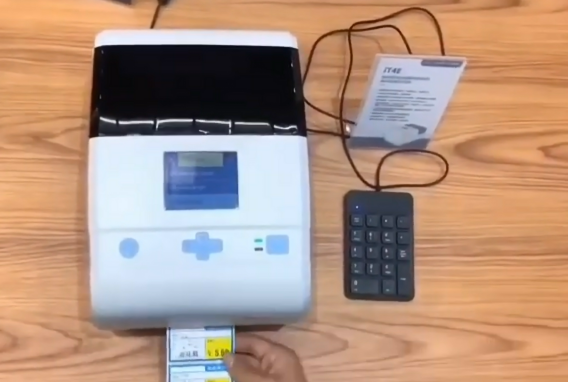
Stored Label Templates
A label template is typically created in advance on a computer using label design software or a supported configuration tool. The template defines the label layout, including barcode position, text fields, fixed content, variable fields, label size, print direction, and formatting rules.
Once prepared, the template can be stored in the printer’s memory or in other supported local storage, depending on the printer model and system setup.
This keeps daily printing consistent: operators select the template, enter or scan variable data, and print.
Local Data Input
After the template is ready, operators enter the variable data directly at the workstation. Common input methods include:
- • Barcode scanner for scanning SKUs, work orders, carton codes, or asset IDs.
- • USB keyboard for entering batch codes, quantities, dates, or location IDs.
- • Touchscreen or front-panel input for selecting templates or entering basic data on the printer.
- • USB storage or local media for loading supported data files in project-specific offline workflows.
Availability depends on the printer model, firmware, interface options, and final configuration.
Printer-Side Execution
The printer maps scanned or entered data into preset template fields and prints fixed-format labels with changing data, such as SKU labels, batch labels, carton labels, location labels, or work order labels.
iDPRT Standalone Barcode Printer Solutions and Applications
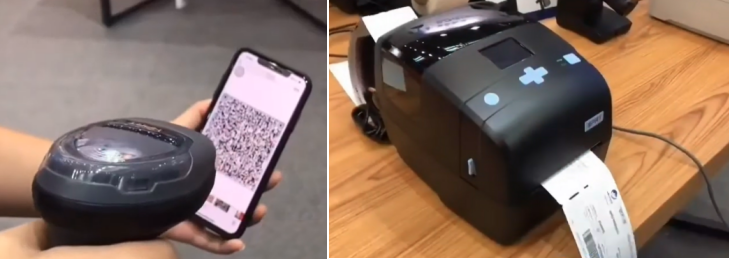
iDPRT provides high-quality standalone barcode printers for businesses that need flexible offline label printing at the point of work. For scan-to-print workflows, iDPRT offers compatible printer and scanner configurations based on print volume, workspace, and operating environment.
Scalable Lineup
2-inch and 4-inch desktop printers for compact stations, plus industrial models for higher-volume warehouse, production, and logistics labeling.
Flexible Connectivity
Supports interface options such as USB Host, LAN, Wi-Fi, barcode scanner input, and USB keyboard input, depending on the printer model and configuration.
Onboard Memory for Templates
Stores label templates, formats, fonts, and graphics for repeatable offline printing workflows.
Broad Compatibility
Supports common 1D/2D barcode symbologies and multilingual label content.
Intuitive Controls
Selected models include LCD screens, touchscreens, or front-panel controls for template selection, printer status, and basic operation.
Choose the Right iDPRT Offline Barcode Printing Setup
| Offline Labeling Workflow | Input Method | Recommended iDPRT Setup | Best-Fit Applications |
|---|---|---|---|
| Scan-to-print labeling | Barcode scanner | iDPRT iE4P + HN-3208SR | Retail backroom relabeling, small-batch production labels, asset tagging |
| Scan-to-print labeling | Barcode scanner | iDPRT iQ4 + HN-3578SR | Production line labeling, inbound inspection labels, logistics dock labeling |
| Manual variable data entry | USB keyboard | iDPRT iD4P / iE4P + USB keyboard | Batch labels, date labels, serial number labels, service labels |
1. Scan-to-Print Offline Labeling with a Barcode Scanner
For scan and print workflows, operators scan an existing barcode, the printer calls a stored template, and labels are printed locally without a dedicated PC.
iDPRT iE4P + HN-3208SR for Desktop Scan-to-Print Workflows
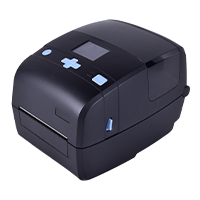
- Resolution: 203dpi, 300dpi
- Print method: Direct Thermal and Transfer Thermal
- Max. print speed: 8 ips @203 dpi, 6 ips @300 dpi
- Max. print width: 4.25"(108 mm) @203 dpi, 4.17"(106 mm) @300 dpi
- Memory: 128 MB Flash / 256 MB RAM
Choose the iDPRT iE4P + HN-3208SR setup for compact, on-demand scan-to-print labeling in small-batch production and retail and asset management workflows.
The iDPRT iE4P is a 4-inch thermal transfer barcode printer suitable for template-based offline label printing in space-constrained workstations. With USB Host support, onboard memory for label templates, and a color LCD for intuitive operation, it functions as a compact standalone labeling station when paired with the HN-3208SR handheld scanner.
Applications:
- •Retail backroom relabeling: Scan product barcodes to print price tags, shelf labels, or replacement product labels.
- •Small-batch production labeling: Scan work order barcodes to print batch labels, process labels, or QC labels.
- •Asset Tagging: Print property and location labels for office and IT asset management.
Recommended reading: How iDPRT iE4P enables compact offline label printing with scanner and keyboard input
iDPRT iQ4 + HN-3578SR for Industrial Scan-to-Print Workflows
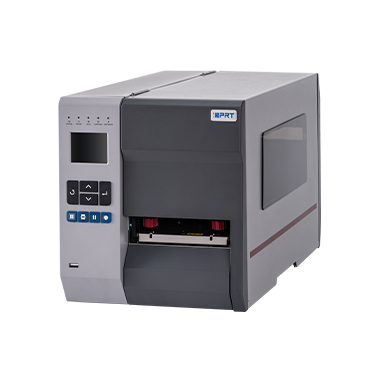
- Resolution: 203dpi, 300dpi
- Print method: Direct Thermal and Transfer Thermal
- Max. print speed: 10 ips @203 dpi, 8 ips @300 dpi
- Max. print width: 4.1"(104 mm) @203 dpi, 4.17"(106 mm) @300 dpi
- Memory: 2G Flash / 256 MB RAM
Choose the iDPRT iQ4 + HN-3578SR setup when your workflow requires a more durable industrial scan-to-print configuration for higher-volume or more demanding labeling environments.
The iDPRT iQ4 is a compact industrial barcode printer with a 2.4-inch LCD screen and an all-metal structure. It features high-speed output, large memory, and flexible connectivity. Paired with the HN-3578SR rugged handheld scanner, it helps operators capture barcode data from work orders, cartons, pallets, assets, or production labels and print labels accurately at the point of work.
Applications:
- •Production line labeling: Scan barcodes containing work order, batch, or process information to print batch labels, WIP labels, traceability labels, or QC labels.
- •Inbound and inspection labeling: Scan material barcodes or inspection document barcodes to print inbound labels, inspection labels, hold labels, or approved labels.
- •Case and carton labeling: Scan carton or case barcodes to print carton labels, case labels, outer box labels, or replacement labels.
- •Logistics dock labeling: Scan pallet, transfer, or shipping barcodes to print pallet labels, transfer labels, or shipping labels.
2. Offline Barcode Printing with a USB Keyboard
For manual variable data entry, choose an iDPRT desktop barcode printer with USB keyboard support when operators need to update small fields such as batch numbers, dates, quantities, serial numbers, service mileage, item codes, or location IDs. The input is added to a saved template, so labels can be printed locally without a dedicated PC.
Recommended iDPRT Printers for USB Keyboard Input
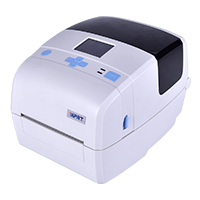
- Resolution: 203dpi, 300dpi
- Print method: Direct Thermal
- Max. print speed: 8 ips @203 dpi, 6 ips @300 dpi
- Max. print width: 4.25"(108 mm) @203 dpi, 4.17"(106 mm) @300 dpi
- Memory: 128 MB Flash / 256 MB RAM
- Resolution: 203dpi, 300dpi
- Print method: Direct Thermal and Transfer Thermal
- Max. print speed: 8 ips @203 dpi, 6 ips @300 dpi
- Max. print width: 4.25"(108 mm) @203 dpi, 4.17"(106 mm) @300 dpi
- Memory: 128 MB Flash / 256 MB RAM
Applications for Keyboard Input:
- •Small-batch label printing: Batch numbers, dates, quantities, work order numbers.
- •Serial number and asset labels: Serial numbers, asset IDs, equipment IDs.
- •Service labels: Service mileage, next service date, vehicle information.
- •Temporary label printing: Short-run or changing information for stockrooms, backrooms, events, or temporary workstations.
Build Your Offline Barcode Labeling Workflow with iDPRT
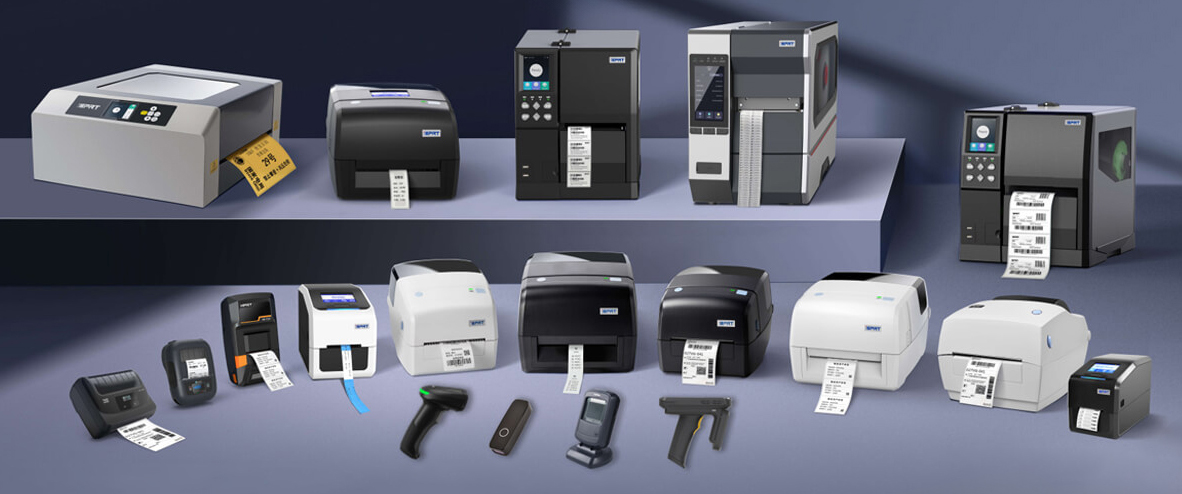
Standalone barcode printing is more than a product feature. It helps teams standardize routine label printing at the workstation, from stockroom relabeling to production line traceability.
Whether your team needs a scanner + printer setup for warehouse relabeling or a keyboard + printer setup for small-batch labels, iDPRT can help you choose the right configuration.
Tell us your label size, print volume, input method, application environment, and barcode labeling process. We will help match the right desktop or industrial barcode printer for your offline labeling workflow.
FAQs About Standalone Barcode Printing
What is a standalone barcode printer?
A standalone barcode printer can print labels without being continuously connected to a computer. It uses stored templates, local input, and printer-side execution for routine label printing.
Can I print barcode labels without a PC?
Yes. With a standalone barcode printer, operators can print labels through stored templates, barcode scanner input, USB keyboard entry, or supported offline workflows.
Can a barcode printer work offline?
Yes. Selected barcode printers can work offline when label templates and variable data are stored, scanned, or entered locally.
How does scan-to-print work?
Operators scan a barcode, and the printer uses the scanned data to trigger a stored template and print a matching, duplicate, or related label.
What can I use a standalone barcode printer for?
It can be used for SKU labels, carton labels, shelf labels, batch labels, work order labels, asset tags, equipment labels, oil change stickers, and replacement barcode labels.
Can I use a barcode printer in a warehouse?
Yes. It can support receiving labels, inventory labels, location labels, carton labels, pallet labels, and reprint tasks in warehouse workflows.
Can I use a standalone printer on a production line?
Yes. It can print batch labels, WIP labels, QC labels, serial number labels, traceability labels, and work order labels directly on site.