




Quick Overview
The Amazon FNSKU barcode is a seller-specific barcode used to track inventory in Amazon FBA. It is different from ASIN and UPC: ASIN identifies the Amazon listing, UPC identifies the retail product, and FNSKU identifies the seller’s inventory unit within the fulfillment network.
For many Amazon sellers, this question usually appears when preparing FBA shipments. A product may already have a UPC on the packaging, but Amazon may require an FNSKU label instead.
This guide explains how Amazon FNSKU barcodes work and how to handle labeling correctly in real FBA workflows. It covers:
- What an Amazon FNSKU barcode means
- ASIN vs FNSKU vs UPC
- How to create an Amazon FNSKU barcode
- How to print FNSKU barcode labels correctly
- Where to place the FNSKU label
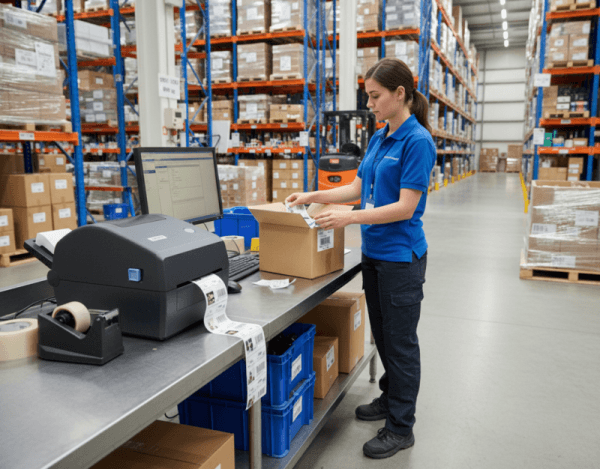
What Is an Amazon FNSKU Barcode?
An Amazon FNSKU barcode is a unique identifier used by Amazon to track seller-specific inventory in the Fulfillment by Amazon (FBA) system. FNSKU stands for Fulfillment Network Stock Keeping Unit, and each code links a product unit to a specific seller account.
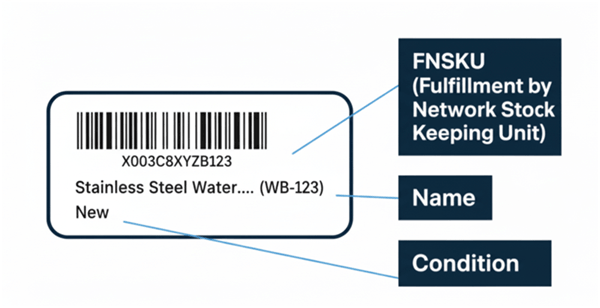
This FNSKU code enables Amazon to receive, store, and ship inventory accurately within its fulfillment network. Even when multiple sellers offer the same product listing, the FNSKU ensures that each unit is correctly associated with the seller who sent it to the fulfillment center.
In practice, the FNSKU barcode becomes the operational barcode Amazon uses to manage inventory accuracy across its fulfillment centers.
ASIN vs FNSKU vs UPC
ASIN, FNSKU, and UPC often appear together when sellers create listings or prepare FBA shipments. Each code identifies a different layer of the Amazon marketplace and fulfillment process.
For example, imagine a stainless steel water bottle sold by several sellers on Amazon:
Multiple sellers offer the same product listing:
Seller A
FNSKU: X001A23BCD
Seller B
FNSKU: X001B45EFG
Seller C
FNSKU: X001C78HIJ
In this example, the UPC identifies the product globally, the ASIN identifies the product listing on Amazon, and each FNSKU identifies the inventory sent to FBA by a specific seller.
Even though multiple sellers offer the same product under one ASIN, Amazon uses different FNSKU barcodes to track which seller owns each unit stored in its fulfillment centers.
In summary: UPC identifies the product, ASIN identifies the Amazon listing, and FNSKU identifies the seller’s specific inventory within FBA.
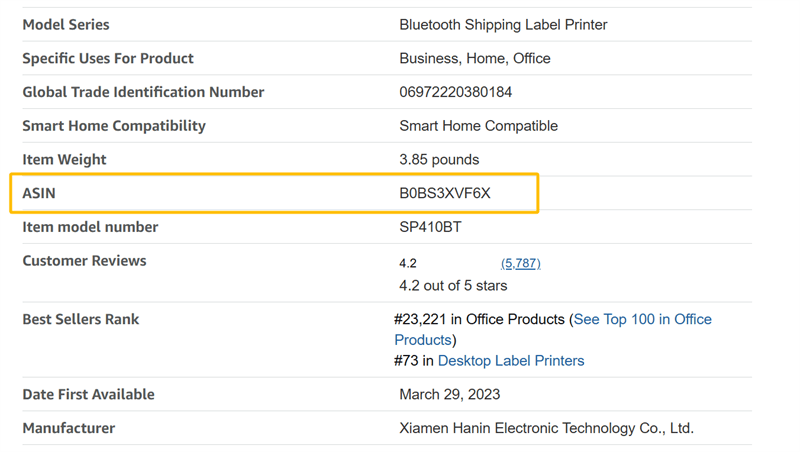
The following table summarizes the differences between these identifiers.
| Code | What It Identifies | Where It Is Used | Seller-Specific |
|---|---|---|---|
| ASIN | An Amazon product listing | Amazon catalog | No |
| UPC | A retail product | Retail and marketplaces | No |
| FNSKU | Your FBA inventory unit | Amazon fulfillment operations | Yes |
Do You Need an FNSKU for Amazon FBA?
Not always. The answer depends on your barcode eligibility and Amazon’s current FBA labeling rules.
? 2026 Update Notice
According to Amazon Seller Central documentation, FBA barcode requirements are scheduled to change starting March 31, 2026. Eligible brand owners may continue using manufacturer barcodes without applying additional Amazon labels, provided their products meet Amazon’s eligibility criteria.
Amazon also plans to update how manufacturer barcodes and commingled inventory are handled in the FBA system. Sellers who rely on manufacturer barcodes may need to meet additional requirements, including brand ownership verification or Brand Registry eligibility in certain cases.
In practical terms:
- ✓ You will usually need an FNSKU label if Amazon requires an Amazon barcode for your item.
- ✓ You may be able to use a manufacturer barcode if your product and account qualify under Amazon’s updated rules.
The safest workflow is simple: check your barcode preference and labeling requirements in Seller Central before printing labels or preparing FBA shipments.
How to Create an Amazon FNSKU Barcode
Once a product is listed for Fulfillment by Amazon (FBA), Amazon automatically assigns an FNSKU to that inventory. Sellers do not manually generate the code themselves; instead, the FNSKU is created within Amazon Seller Central and can be printed as a barcode label for each unit.
Note: For listings fulfilled by merchant (FBM), an FNSKU is usually not required because Amazon does not manage that inventory in its fulfillment centers.
Step-by-Step: How to Get Your FNSKU in Seller Central
Sign in to Amazon Seller Central.
Go to Inventory and open Manage Inventory.
Find the FBA SKU you want to label.
Open the action menu for that SKU.
Select Print item labels.
Choose the quantity and label format.
Download the label file.
The downloaded file contains the Amazon FNSKU barcode labels assigned to that seller’s inventory.
How to Print FNSKU Barcode Labels Correctly
FNSKU Barcode Label Size and Barcode Requirements
Amazon provides clear guidelines for FNSKU label size and barcode readability. Most label formats generated in Seller Central fall within a range of approximately 1 inch × 2 inches to 2 inches × 3 inches, depending on the selected template.
To meet Amazon requirements, FNSKU labels should follow these basic rules:
- Print in black on a white background
- Maintain sufficient white space around the barcode
- Ensure the barcode is sharp and not compressed or stretched
- Keep the label fully visible and scannable
These requirements help Amazon scanners read the barcode quickly during inbound processing.
Why Use a Thermal Printer for FNSKU Labels
For Amazon FBA labeling, a thermal barcode printer is the standard choice. It delivers sharp, high-contrast barcodes on label rolls and keeps output consistent across large batches.
Compared with standard office printers, thermal printers offer several advantages:
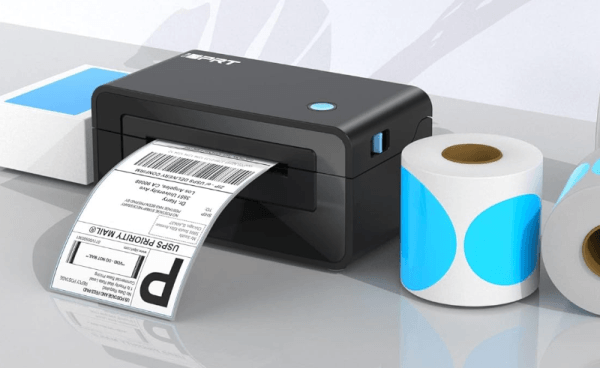
The right printer depends mainly on your shipment volume and labeling frequency.
For small businesses or low-volume sellers, a compact desktop thermal printer is usually sufficient.
For medium to large sellers handling frequent shipments, a higher-speed barcode printer provides better efficiency and consistency.
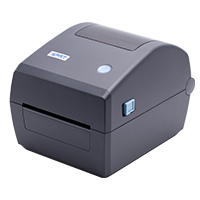
Top FNSKU Label Printer: iDPRT iD888
Best for: medium to high-volume FBA labeling and shipping workflows
- ✦ Compact size and lightweight design
- ✦ Fast output for large FNSKU labeling batches
- ✦ Consistent, scannable barcode quality under continuous use
- ✦ Supports media from 1" to 4.64", ranging from small FNSKU barcodes and UPC labels to 4×6 shipping labels
- Resolution: 203dpi
- Print method: Direct Thermal
- Max. print speed: 8ips
- Max. print width: 4.25 inches(108mm)
- Memory: 128MB Flash / 32MB RAM
The iDPRT iD888 is a 4-inch direct thermal barcode printer ideal for eCommerce sellers on platforms such as Amazon, eBay, and Shopify. It handles both product labeling and shipping workflows in one device, with a compact footprint and simple setup that fits easily into small workspaces.
It delivers stable, continuous output for a wide range of labels, including FNSKU (X00) barcodes, UPC barcodes, product labels, and shipping and logistics labels, making it a reliable choice for warehouse, prep center, and daily fulfillment operations.
Learn More About iD888Step-by-Step: How to Print FNSKU Labels with a Thermal Printer
Thermal label printers are simple to set up and only require a label roll. Follow the steps below to print your FNSKU labels.
Download the FNSKU label file from Seller Central
Open the file and select the correct label size for your label roll
Connect your thermal label printer and choose it as the print device
Set the print scale to 100% (no scaling) to avoid barcode distortion
Adjust print density to ensure the barcode is dark and clear
Print one test label and scan it to confirm readability
Once verified, print the remaining labels in batches
⚠️ Always test and scan a sample label before applying it to your products to avoid receiving issues.
Where to Place the FNSKU Label
Placement matters as much as print quality.
Put the Amazon FNSKU barcode on a flat surface where warehouse staff can scan it easily. Avoid edges, folds, corners, textured areas, and glossy seams. Do not place it where packaging wrinkles or shrink wrap glare can distort the scan.
If multiple barcodes are visible on the package, Amazon may scan an unintended barcode. For this reason, sellers often cover the original UPC or EAN when an Amazon barcode is required.
Frequently Asked Questions
What is an Amazon FNSKU barcode?
An Amazon FNSKU barcode is a seller-specific barcode used to identify FBA inventory and connect each unit to a seller account inside Amazon’s fulfillment network.
Is FNSKU the same as ASIN?
No. ASIN identifies the listing. FNSKU identifies the seller’s inventory unit inside FBA.
Is FNSKU the same as UPC?
No. UPC identifies the product in retail commerce. FNSKU identifies your inventory inside Amazon FBA.
What is an X00 barcode?
An X00 barcode is an Amazon-assigned barcode used in FBA, usually as part of an FNSKU. It identifies seller-specific inventory and is used when Amazon requires its own barcode instead of a UPC or EAN.
What is the correct Amazon FNSKU label size?
Amazon guidance commonly points to label sizes in the range of 1 inch x 2 inches to 2 inches x 3 inches, with clear black print on a white background and enough white space for scanning.
Can I print FNSKU labels with a thermal printer?
Yes. A thermal label printer is often one of the best options for printing clear, scannable Amazon barcode labels.
Does Amazon still offer FNSKU labeling service?
For US FBA shipments, Amazon says it will no longer offer prep and item labeling services starting January 1, 2026.
Final Thoughts
The Amazon FNSKU barcode sits at the center of FBA operations. When labeling is done correctly, inventory moves smoothly through receiving, storage, and fulfillment. When it is not, issues usually appear later in the process—often when they are harder to fix.
A reliable workflow starts with clear fundamentals and ends with consistent execution. Understand the difference between FNSKU, ASIN, and UPC. Confirm whether your product requires an Amazon barcode. Use the correct label size, print it clearly, and test it before shipping.
Amazon’s labeling requirements continue to evolve. Checking current guidelines before each shipment helps avoid costly delays and keeps your FBA operations running without interruption.
Recommended Reading